

Updated
What’s Changing?
Playlab is strengthening its safety and moderation systems to give educators and administrators better visibility into student interactions. These updates focus on three areas: improved moderation accuracy, org-level notification controls, and clearer tools for reviewing flagged content.Moderation Improvements
Playlab’s moderation system automatically detects and hides potentially inappropriate AI messages from being shown to users. Ongoing improvements include:- Refining moderation categories to be more intuitive and clearly labeled
- Checking app prompts for usage policy violations before they turn into problematic conversations
- Using additional context from surrounding messages to reduce false positives
- In-product moderation feedback so users can report incorrect flags
- A data annotation pipeline to train more accurate moderation models
Moderation is still in active development. If you encounter a moderation decision that seems incorrect, please let us know at [email protected].
Moderated user lists exclude Playlab staff accounts, so the people you review are only the members of your own organization. The widgets and exports behind these views are also faster and more reliable.
Org-Level Moderation Notifications
Organization admins now receive email notifications when moderated content is detected in their apps. These batch emails provide a digest of flagged activity so you can stay informed without being overwhelmed.
How Notifications Work
- Notifications are batched into a digest sent every 72 hours, so your inbox stays manageable
- Messages flagged for self-harm are the exception: these are always sent as urgent, real-time notifications (see below)
Self-Harm Alerts
Messages flagged for self-harm bypass the digest and are sent as urgent, real-time notifications to your organization’s designated safety recipients.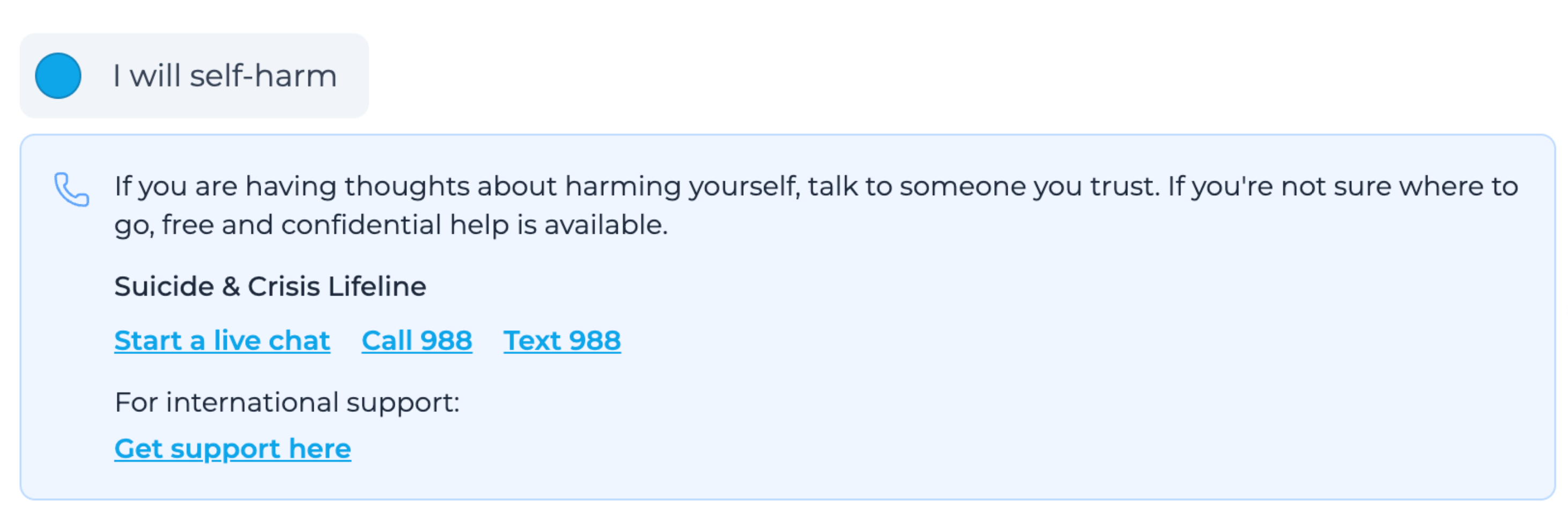
What’s Included in a Notification
Each moderation email includes the flagging rationale, the app name, and a link to review the message in context.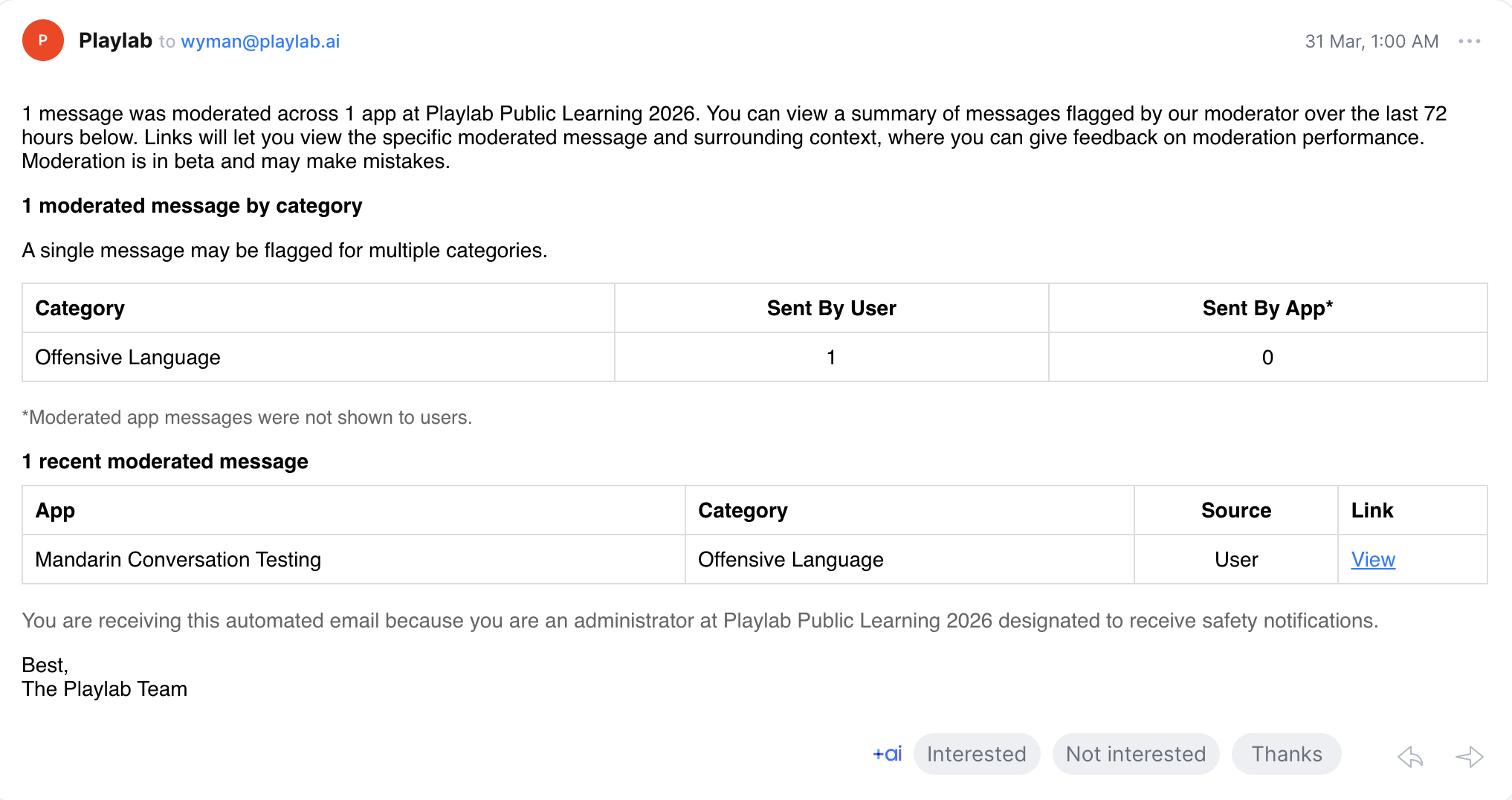
If you received a moderation email and are unsure about a category label, this is expected as the team works to refine category names. Contact your Playlab org admins or reach out to [email protected] with any questions.
Safety Notification Designation
Organizations can designate specific admins to receive safety notifications, giving your team a clear point of responsibility for reviewing flagged activity. These notifications are designed for the people responsible for student safety oversight.Flag Visibility and Acknowledgement
The safety team is building toward a system where flagged content is not only visible but actionable. Upcoming improvements include:- Flag visibility at the space and member level so admins can see what needs attention across their organization
- Acknowledge and mark as seen functionality that lets admins indicate they have reviewed a flag while preserving a full audit trail
- Insights views that surface patterns and trends in flagged content, starting with simple metrics and expanding over time
Responding to a Moderation Email
When you receive a moderation notification, here’s the recommended order of operations:1
Review the flagged message
Click the link in the email to open the flagged message and surrounding context directly in Playlab.
2
Assess the flag
Determine whether the content was correctly flagged or a false positive (a message that shouldn’t have been flagged).
3
Take action based on your assessment
If the flag is correct:
- For self-harm alerts, follow your school or organization’s established safety protocols immediately.
- For other violations, consider updating the app’s instructions or guardrails, and address the incident with the app creator and/or user(s) involved.
- Use Show message & give feedback on the hidden message on your organization’s Sessions page to report it. This feedback directly helps improve moderation accuracy.
4
Monitor ongoing activity
On your organization’s Sessions page (Admin → Sessions), open More filters (the filter icon) and check Moderated by Playlab and Flagged by users to see all moderated and reported messages in one place. Turn on Open at the moderated message to have each session open right at the message that needs attention. This makes it easier to stay on top of flagged content without checking email.Inside a single space or app, the Sessions tab has a Needs attention toggle that does the same job, with a Jump to messages that need attention switch.Builder test conversations are included in this view by default (Show Builder sessions is on), so moderated content from your own testing shows up the same way as end-user conversations.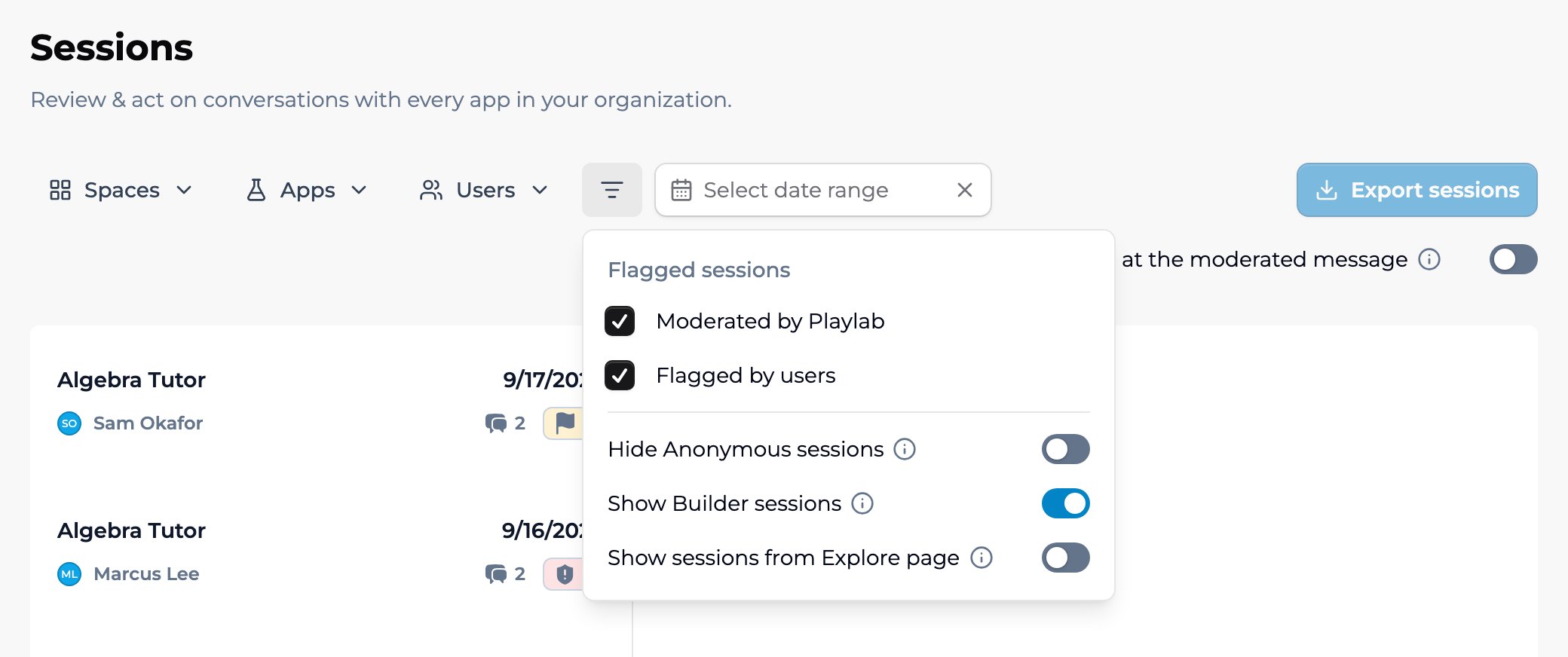
Frequently Asked Questions
How do I get designated to receive safety notifications?
How do I get designated to receive safety notifications?
Contact your organization’s Playlab admin or reach out to [email protected] to be designated to receive safety notifications for your organization.
Can I turn off moderation notifications?
Can I turn off moderation notifications?
Moderation notifications are enabled by default for org admins and space owners. If you need to adjust notification settings, contact [email protected].
What moderation categories does Playlab use?
What moderation categories does Playlab use?
Playlab uses a set of moderation categories to classify flagged content. These categories are being refined for clarity and accuracy. If you see a category label that is confusing, please let us know.
What should I do when I receive a moderation email?
What should I do when I receive a moderation email?
See the Responding to a Moderation Email section above for a step-by-step guide.
Does Playlab replace my school's safety protocols?
Does Playlab replace my school's safety protocols?
No. Playlab’s moderation and notification tools are designed to complement your existing safety protocols, not replace them. Playlab focuses on surfacing what needs attention so your team can follow your own established procedures.
We want your feedback! These safety features are actively evolving based on educator input. If you have ideas, questions, or feedback on how moderation and notifications are working for your organization, reach out to us.